One central panel
All cables home-run to one place, so changing equipment never means rewiring walls.
Structured Wiring
Structured wiring means every room is cabled back to one clean panel: Ethernet, coax, speaker wire and more, all labeled. It is the invisible foundation under good WiFi, cameras, TVs and smart home gear, and the cheapest time to add it is while walls are open.
What you get
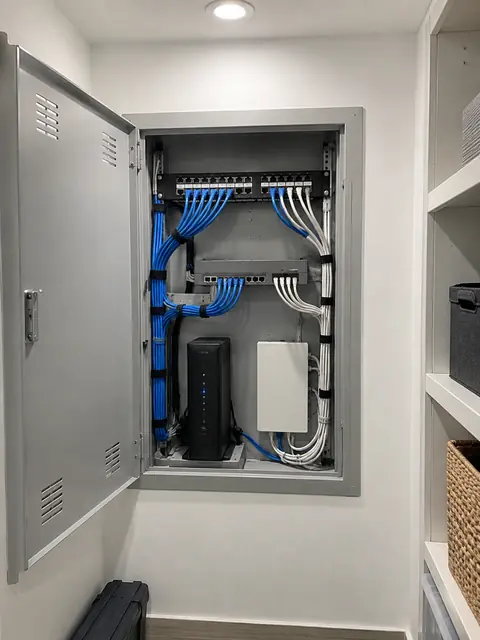
All cables home-run to one place, so changing equipment never means rewiring walls.
Cable that supports gigabit today and 10 Gigabit in many cases, with room to grow.
Every cable labeled at both ends and tested, so you know what goes where.
Outlets for TVs, desks, ceiling access points, cameras and future devices.
A neat rack or wall enclosure with a patch panel, switch and power backup.
We use closets, attics and basements to reach rooms without major demolition.
What most people don’t know
Plain answers from the install side, so you can decide with the full picture.
Each outlet should have its own cable back to the panel, not one cable passing through several rooms. That keeps each connection fast, easy to troubleshoot and easy to change.
Technology changes faster than walls. A simple conduit (a hollow pipe) between key points lets you pull new cable later without opening drywall. It is one of the cheapest forms of future proofing.
Cat5e handles gigabit, Cat6 does gigabit well and 10 Gigabit over shorter runs, and Cat6A handles 10 Gigabit at the full 100 meters. Cable quality matters: cheap “copper-clad” cable can fail tests and cause power problems with PoE devices.
A diagram of which cable goes where might be the most valuable part of the job. Years later it saves hours for whoever works on your system next.
How it works
We look at the space, talk through how you use it and what you want to fix.
A written plan and clear price. Changes are agreed before work happens.
Neat, labeled work, with respect for your home or business.
We test everything, walk you through it and stay available after.
FAQ
During renovation or when walls are open. If walls are closed, we can usually still reach most rooms through attics, basements and closets.
It depends on the room. A typical room might get two to four Ethernet cables plus any special runs. We map it out with you.
Yes. Wired connections make WiFi better: access points, TVs, desktops and cameras should be wired when possible.
We install what you need: coax for legacy TV and antenna, speaker wire for in-wall audio, and low-voltage runs for cameras and keypads.
Yes. Low-voltage work fits between framing and drywall, and we coordinate with your contractor on schedule and placement.
A short description is enough. We will reply with next steps and a written quote.